How to print coloring pages at home (and fix faint lines)
Print coloring pages at the right size, on the right paper, with lines that stay dark. Settings for Letter and A4, pencils and markers, plus fixes by symptom.
Theru Studio12 min read
A good print has sharp dark lines, nothing cut off, and paper that suits the pens you plan to use. Bad prints usually trace back to one of three things: the wrong paper size, the wrong scale, or a saving mode left switched on. The first time through takes about five minutes. After that you can skip the test.
The six settings that matter
- Paper size when you download, in the printer dialog and in the tray should all say the same thing, Letter or A4.
- Scale at Actual size (100%) for our files. They already have a 0.5 in margin.
- Color set to black ink only, grayscale or black and white.
- Quality on Best or High for the final copy. Standard is fine for a test.
- Toner or ink save off. This is the usual cause of faint lines.
- Paper of 24 to 32 lb (90 to 120 gsm) for pencils. Thicker and smoother for markers.
Download the size that matches your paper
Every download button on CrayonNook has a paper size choice, A4 or US Letter, and the PDF you get is one page in that size. A4 is selected to start with, so if your tray holds Letter, switch it before you download. The file name ends in -a4 or -letter, which makes it easy to check later.
Letter or A4
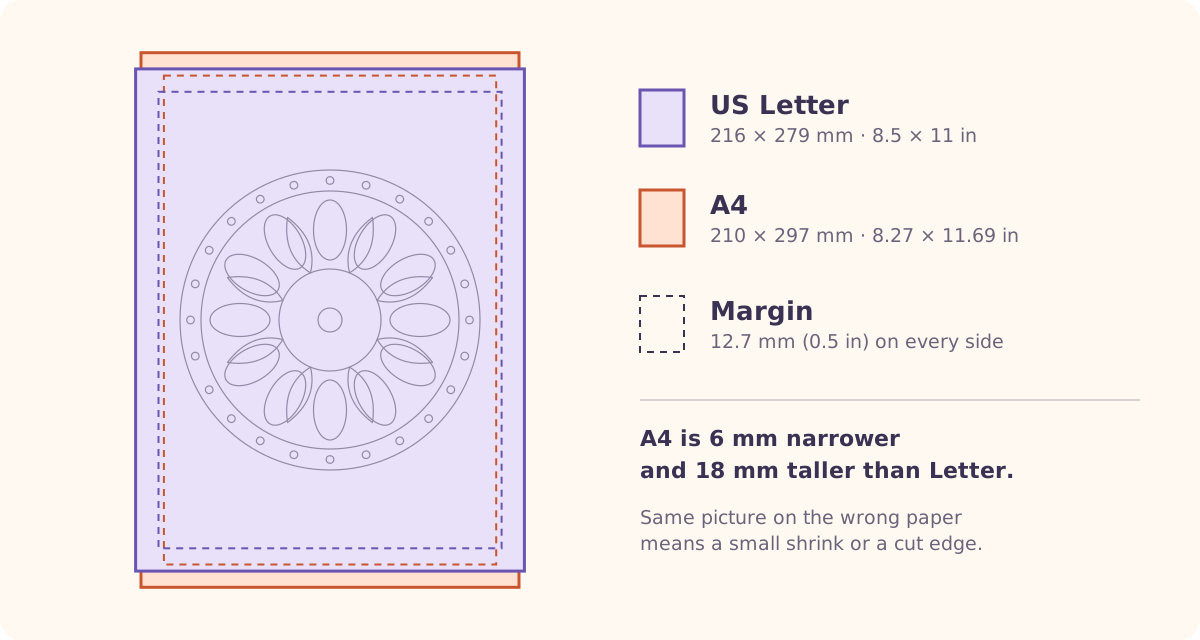
Letter is 8.5 x 11 in (216 x 279 mm). A4 is 210 x 297 mm. A4 is a little narrower and noticeably taller, and that difference is what causes the odd results when the two get mixed up.
| Paper in the tray | Letter | A4 |
|---|---|---|
| Size | 216 x 279 mm (8.5 x 11 in) | 210 x 297 mm (8.3 x 11.7 in) |
| Common in | US, Canada, Mexico and much of Latin America, the Philippines | Most of the rest of the world |
| File is the other size, scaled to fit | A4 page on Letter paper: art shrinks about 6% | Letter page on A4 paper: art shrinks about 3%, with extra space top and bottom |
| File is the other size, not scaled | A4 page on Letter paper: the bottom 18 mm is cut off | Letter page on A4 paper: the right edge loses about 6 mm, which our margin absorbs |
The rule is simple: the paper size should match in three places. Your app (PDF viewer or browser), the printer dialog, and the paper actually sitting in the tray. If a page looks small or cut off, one of the three disagrees. The printer driver's setting is the one that wins.
Scale: Actual size or Fit
Advice online disagrees about this, and both sides are right for different files. It depends on whether the file already matches your paper and has a margin.
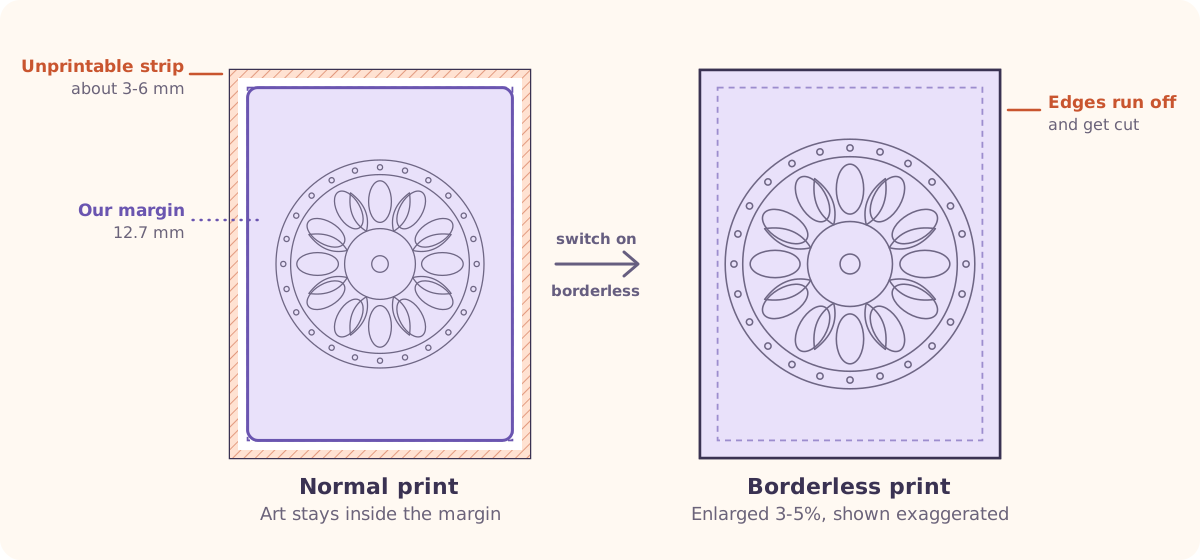
Our PDFs do. The art sits inside a 0.5 in (12.7 mm) margin on both Letter and A4. Printers cannot print right to the edge, and the unprintable strip is usually only a few millimetres. Epson, for example, lists 3 mm at the top and bottom on one of its models. Our margin is several times that, so Actual size (100%) is safe and keeps the art from shrinking.
Use Fit to printable area only as a safety net, for a file from somewhere else whose art touches the edge, or when you see the edges clipped. Fitting a file that already has margins just shrinks it and adds a second border.
Choose the paper for the pen
Start from what you will color with. Plain 20 lb copy paper (about 75 gsm) is a fine place to begin and still works for light pencil, fine-liners and dry markers. These ranges are community guidance, not a standard, so treat them as a starting point.
| Tool | Paper to try | Notes |
|---|---|---|
| Coloured pencils | 90 to 120 gsm (24 to 32 lb), 120 to 160 gsm feels nicer | A little tooth helps the pencil grip. Very smooth, hard paper takes fewer layers. |
| Gel pens, fine-liners | 90 to 120 gsm | Smooth paper. Check the back for show-through. |
| Crayons | Plain copy paper (about 75 gsm) works | A little tooth is fine. |
| Water-based markers | 120 gsm and up, smooth | Print on a laser printer if you can (see below). |
| Alcohol markers | Around 160 to 200 gsm, smooth, or marker paper | They bleed through most papers. Work over a scrap sheet. |
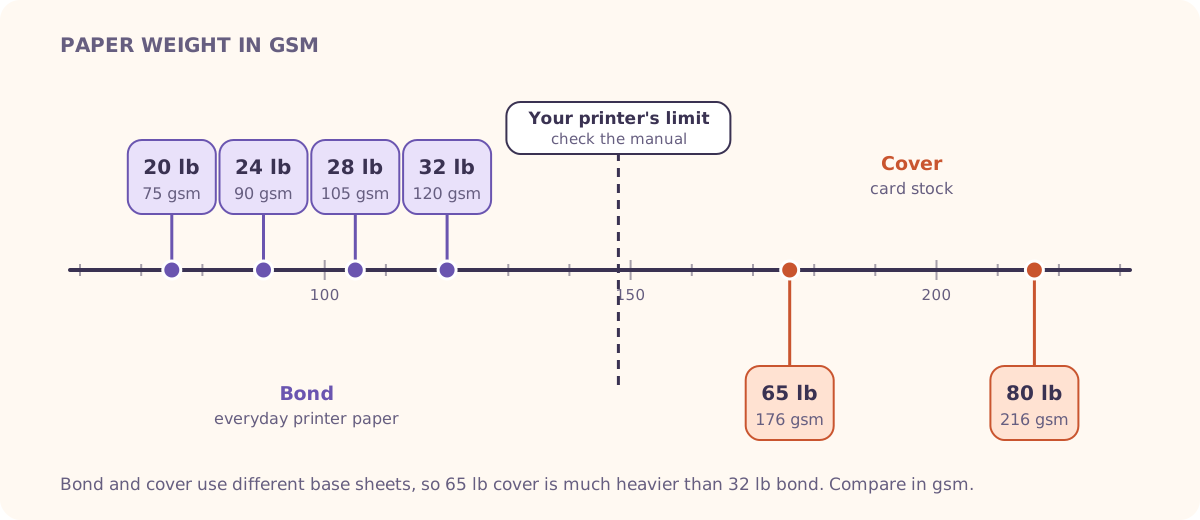
Finish matters as much as weight. Matte, uncoated paper takes pencil and marker. Glossy photo paper does not, so avoid it. Before you commit to a long session on a new paper, scribble in the margin with the pen you will use and check the back.
Set up the print dialog
Menu names change with every printer and operating system, so go by what each setting does. Open the full dialog, not the quick one, and look for a "More settings" or "Properties" button.
A first print, step by step
Open the PDF and check the preview
Open the file in a PDF viewer or browser and press print. If the preview shows the art with an even white border all round, leave the scale alone.
Set the paper size
Choose Letter or A4 to match the paper in the tray. Leave orientation on portrait unless the page is wider than tall.
Check the file matches
The file name ends in
-a4or-letter. If it does not match the paper in the tray, download the other size. Set one copy.Set the scale
Pick Actual size or 100%. Avoid Shrink to fit and borderless for our files.
Choose black ink only
Look for Grayscale, Black ink only or Black and white. It saves color ink, and some printers mix color inks to make a muddy black if you leave it on color.
Set quality and paper type
Use Standard for the first test and Best for the final copy. Set the paper type to plain for copy paper, or Heavy or Cardstock for thick stock. Turn double-sided printing off.
Print a proof on cheap paper
Hold it up against the screen at 100% zoom. Nothing should be cut off, and the lines should be solid black. Then print the real copy on your good paper.
Inkjet, laser and what you already have
Laser toner is fused onto the page with heat, so the print is dry and will not smear under a marker. Inkjet is fine for pencils, crayons and fine-liners. The risk is water-based markers. Dye inks dissolve in water, so a water-based marker can smudge the line even after it has dried. Pigment black inks tend to resist that better once they have cured, though they can take longer to dry at first.
We have not found reliable guidance on alcohol markers over inkjet lines, so test a corner first.
When markers bleed
Bleed shows up three ways: color spreading past the line (feathering), spots on the back of the sheet, and ghosting through onto the page underneath. Heavier paper absorbs more ink, so a thick sheet is no guarantee. Smooth, marker-friendly paper matters more than weight alone.
What helps
- Smoother, thicker paper, or paper sold for markers
- A scrap sheet under the page, always
- Print single-sided, so you are never coloring over another picture
- Lighter pressure and fewer passes over the same spot
- Taping the sheet to a clipboard so it does not slide
Print a whole pack
Theme pages have a "Download PDF pack" button with every picture in one file. Pick A4 or US Letter above the button first. The pack has one page per picture in that size, so a pack of 7 pictures is 7 pages and you can print them all.
Print one page first as a proof, then the rest. Feed thick stock one sheet at a time, from the rear tray if you have one, and let each sheet flatten before it goes in the next feed, because a curled sheet jams. Keep the stack flat under a heavy book afterwards. If you would rather have the set bound, our book builder turns your chosen pages into a single book.
Printing at a library or copy shop
No printer is a perfectly good plan. Shop copiers typically use toner, so the lines are dry and will not smear.
What to bring and ask for
- The PDF on a USB stick, emailed to yourself, or as a cloud link
- Ask for black and white, single-sided, at 100%
- Say Letter or A4, and bring the PDF downloaded in that size
- Ask whether they stock heavier paper, and what it costs
- Check the posted fee sheet. Black-and-white pages usually run roughly 10 to 25 cents, and heavier stock costs more
Shop machines also have an unprintable edge of a few millimetres, so keep the scale at 100% there too. Our margin covers it.
Fix it by symptom
| What you see | Why | First fix |
|---|---|---|
| Faint or gray lines | Toner or ink save, a draft mode, or low ink. Our files are pure black on white, so it is rarely the file. | Turn off toner or ink save (HP calls it EconoMode). Print on Best. Run the printer's head-cleaning. |
| Thin or jagged lines | Some Canon drivers use a special mode for colored lines. | Look for a driver option like "Print colored text and lines in black". |
| Edges cut off | Paper size mismatch, or a scale that enlarges. | Match Letter or A4 in the app, driver and tray. Use Actual size, not borderless. |
| Small image with a thick white border | A4 file on Letter paper, or Fit to page on a file that already has margins. | Match the paper size and pick Actual size. |
| Lines smear under markers | Inkjet ink re-wetted by a water-based marker. | Wait longer, use pencils, or switch to laser or a photocopy. |
| Vertical streaks | Often the wrong paper or a dirty printhead. | Run the printer's print quality report and cleaning before replacing cartridges. |
| Marker bleed | Thin or absorbent paper, too much pressure. | Smoother paper, a scrap sheet underneath, single-sided. |
| Paper jams on thick stock | Over the printer's weight limit, or curled sheets. | Check the manual. Feed one sheet at a time from the rear. Or print at a shop. |
| PDF opens blank or only as a preview | A browser preview that does not render the file. | Download it and open it in a PDF viewer, then print from there. |
Save paper and ink
Print the first test on the cheapest paper at Standard quality, and print only the pages you will color. Stay on black ink only. Printing two to a sheet is fine for kids' practice, but each picture shrinks a lot, so skip it for detailed designs.
Keep two stacks next to the printer and label them: a pencil stack of 28 to 32 lb, and a marker stack of heavier, smoother paper. That way nobody loads the wrong paper into the tray.
Questions people ask
Should I use Fit to page or Actual size when printing a coloring page?
For our files, Actual size (100%). They already match Letter or A4 and keep a 0.5 in margin, so nothing needs shrinking. Use Fit to printable area if you have a file from elsewhere whose art touches the edge, or if you see the edges cropped.
What paper is best for printing colouring pages?
It depends on the pen. For pencils and gel pens, 90 to 120 gsm (24 to 32 lb) works well, and 120 to 160 gsm feels better. For markers, go smoother and thicker, around 160 to 200 gsm or marker paper, single-sided, with a scrap sheet underneath. Those ranges are community guidance rather than a standard, and your printer has its own weight limit.
Why do my printed coloring pages look faint or gray?
The usual causes, in order: toner or ink save mode, a draft quality setting, a colored-lines mode, low ink or a dirty printhead, and the wrong paper type. Our files are pure black on white, so look at the printer settings first. Canon notes that with Toner Save on, output may look faint and unclear.
Is a laser or an inkjet printer better for coloring pages?
Laser prints are dry and will not smear under markers. Inkjet is fine for pencils, crayons and fine-liners, but water-based markers can smudge inkjet lines. Pigment black inks resist this better once cured. If you have an inkjet, rub a corner with a damp finger before you start.
Why did my coloring page print at the wrong size?
The PDF and the paper do not match. Every download lets you pick A4 or US Letter (A4 is the default), and the file name ends in -a4 or -letter. Download the size that matches your tray, then print at Actual size (100%).
Can I print coloring pages on cardstock at home?
Often, yes. Check your printer's maximum paper weight first, use the rear or manual feed one sheet at a time, and set the paper type to Heavy or Cardstock. If it jams, print at a copy shop. And remember that "65 lb cardstock" is about 176 gsm.
Can I print coloring pages at a library or copy shop?
Yes. Bring the PDF on a USB stick or email it to yourself, and ask for black and white, single-sided, at 100%. Black-and-white pages usually run roughly 10 to 25 cents each, so check the posted fee sheet.
Try it on a real page
Pick a page from the free printable unicorn coloring pages or mandala coloring pages for adults, and use the Print button on any page. Prefer not to print at all? You can colour it on screen instead. For more printable fun, see the printables hub.
Written by Theru Studio, the small team behind CrayonNook.
Keep reading
How to Blend Colored Pencils on Printed Coloring Pages
How to get smooth, even blends on a coloring page printed at home: layer lightly, burnish last, and skip the oil and water tricks that ruin thin printer paper.
10 min read